For trades
Timesheets for trades.
Your crew logs hours from their phone on site. Approve the week in one pass, see what the pay comes to and export it for payroll.
Built for crews on the tools
Builders and carpenters
Electricians and plumbers
Landscapers
Cleaning and maintenance crews
“[A real result from a trade business owner, in their words. For example: how long the Friday timesheet chase takes now.]”
[Customer name], [Business]
What changes
Three things it takes off a trade business’s plate.
Hours scribbled on paper and lost in the ute.
The crew logs hours from their phone at the end of a shift.
Checking every sheet one by one.
Approve the whole crew’s week in one pass.
Retyping hours for payroll.
Export the week, ready for payroll.
See it in 30 seconds
Site to payroll, in four steps.
What a week looks like, from the roster to the pay run.
Step 1
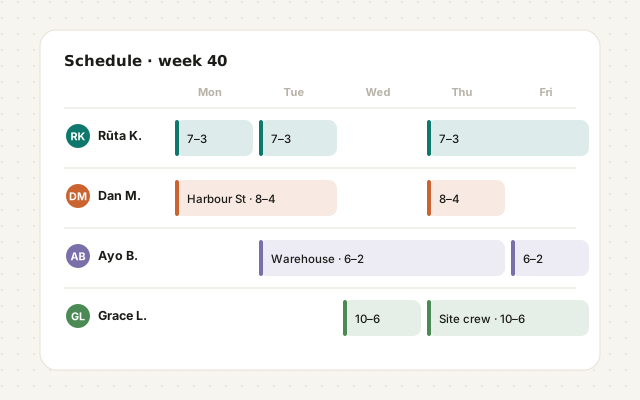
Plan the week
Shifts set before the week starts, so everyone knows where to be.
Step 2
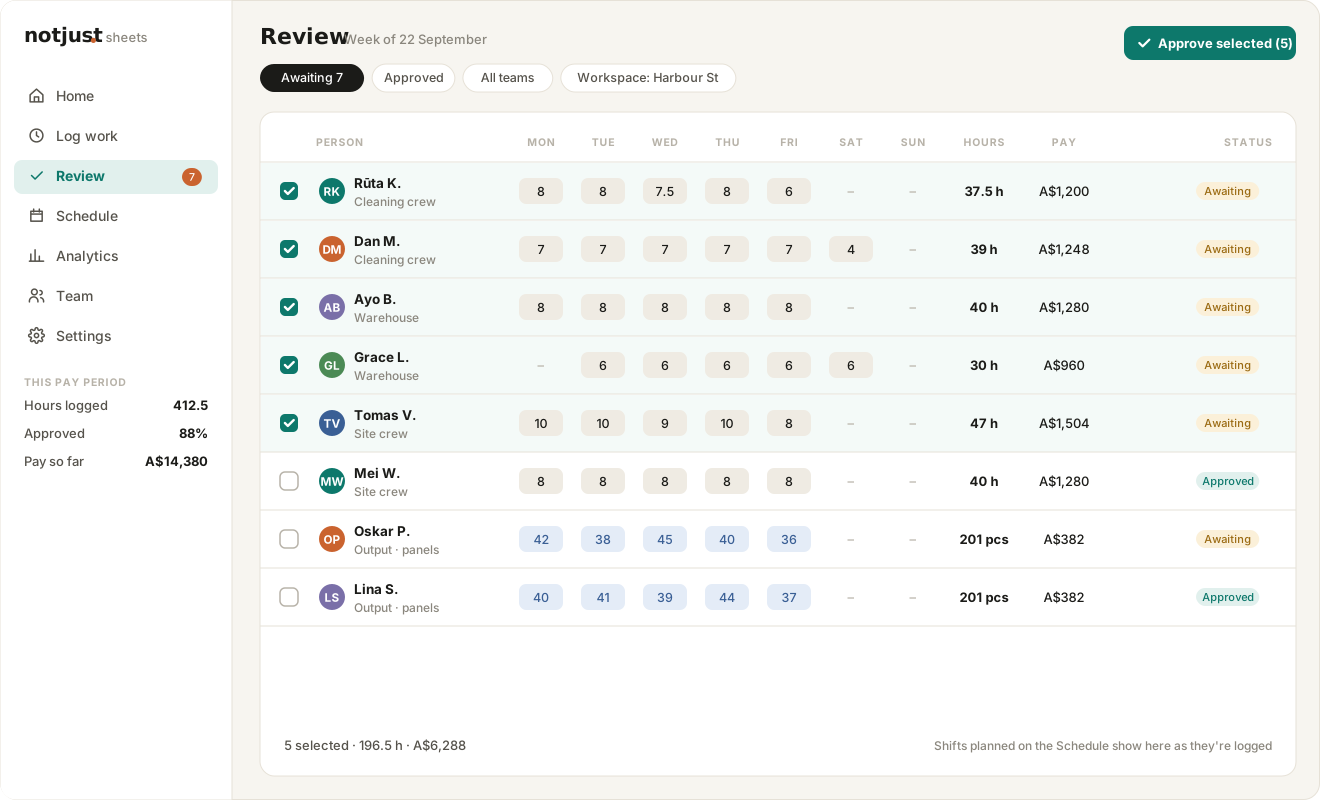
Sheets come in
Each person’s hours or output lands in one list to check.

Step 3
Approve in one pass
A whole week signed off at once, with the hours totalled.
Step 4
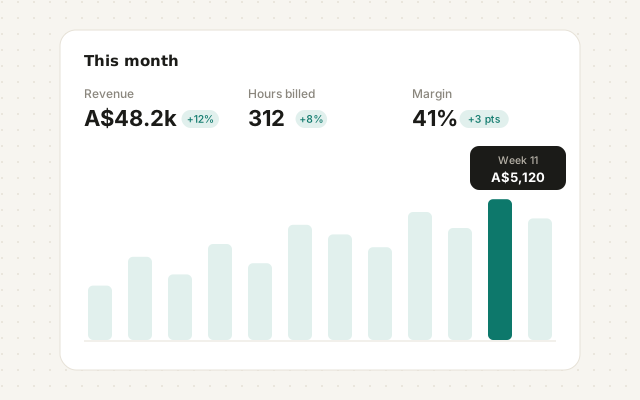
See where the hours went
Hours by person and by job, and the week exported for payroll.
What it does
Everything Sheets does
Logged from any phone
Hours and what they worked on, in a form that takes a minute at the end of a shift.
Hours or output
Track time, units produced, or both, with a rate per person or per item.
Approve in bulk
Filter to what’s awaiting, tick the week and approve it. People are told when their sheets are approved.
Shift schedule
Plan shifts by person and team. Team managers plan their own team’s week.
Analytics
Hours, output and pay by person, workspace and item, over any range.
Exports
Download CSV or Excel with tabs for sheets, people, workspaces and teams when payroll asks.
Up close
From the phone to payroll
Review
A whole week, approved in one pass
Everything waiting for you in one list. Open a sheet to check it, or approve a whole team at once.
Awaiting and approved at a glance
Add hours for someone without the app
Pay worked out as you approve
Schedule
Plan the week before it happens
Put shifts on the schedule, and your team sees them on their phones. Planned shifts show up when they log the day.
By person and by team
Managers plan their own team
Everyone told when shifts change
Analytics
Know where the hours went
See hours, output and pay by person, workspace and item for any pay period, then export it for payroll.
Weekly, fortnightly or monthly periods
EUR, USD or AUD
CSV or Excel export
“[A second trade result. For example: what pay week looks like now.]”
[Customer name], [Business]
Plans
Sheets plans
Monthly, or yearly with two months free. Start any plan free for 14 days.
Mini
A$5
a month
A solo trader with one helper. Or A$50 a year.
Up to 2 people
Unlimited work sheets
Workspaces for your sites and jobs
Analytics for the owner
Email notifications
Start
A$12
a month
A small team getting the paperwork straight. Or A$120 a year.
Up to 10 people
Everything in Mini
CSV export
Team
A$15
a month
The crew that’s outgrown a spreadsheet. Or A$150 a year.
Up to 50 people
Everything in Start
Full analytics
Priority support
Unlimited
A$49
a month
As many people as you can hire. Or A$490 a year.
Unlimited people
Everything in Team
Prices in Australian dollars. Yearly is ten months’ price for twelve. Every plan includes unlimited sheets and starts with a 14-day free trial.
FAQ
Sheets questions
Can my team use it without the app?
Yes. Managers can log hours for people who don’t use it, and everyone else logs from their phone’s browser.
Can I track output instead of hours?
Which currencies does it support?
Less admin. More getting things done.
See what your day looks like when the spreadsheets, messages and paperwork finally work together.