← All guides
Workshop
5 min read
How to run a bike workshop board without a whiteboard
Columns, statuses and a queue: how to see every job in the shop at a glance, and stop losing bikes between drop-off and collection.
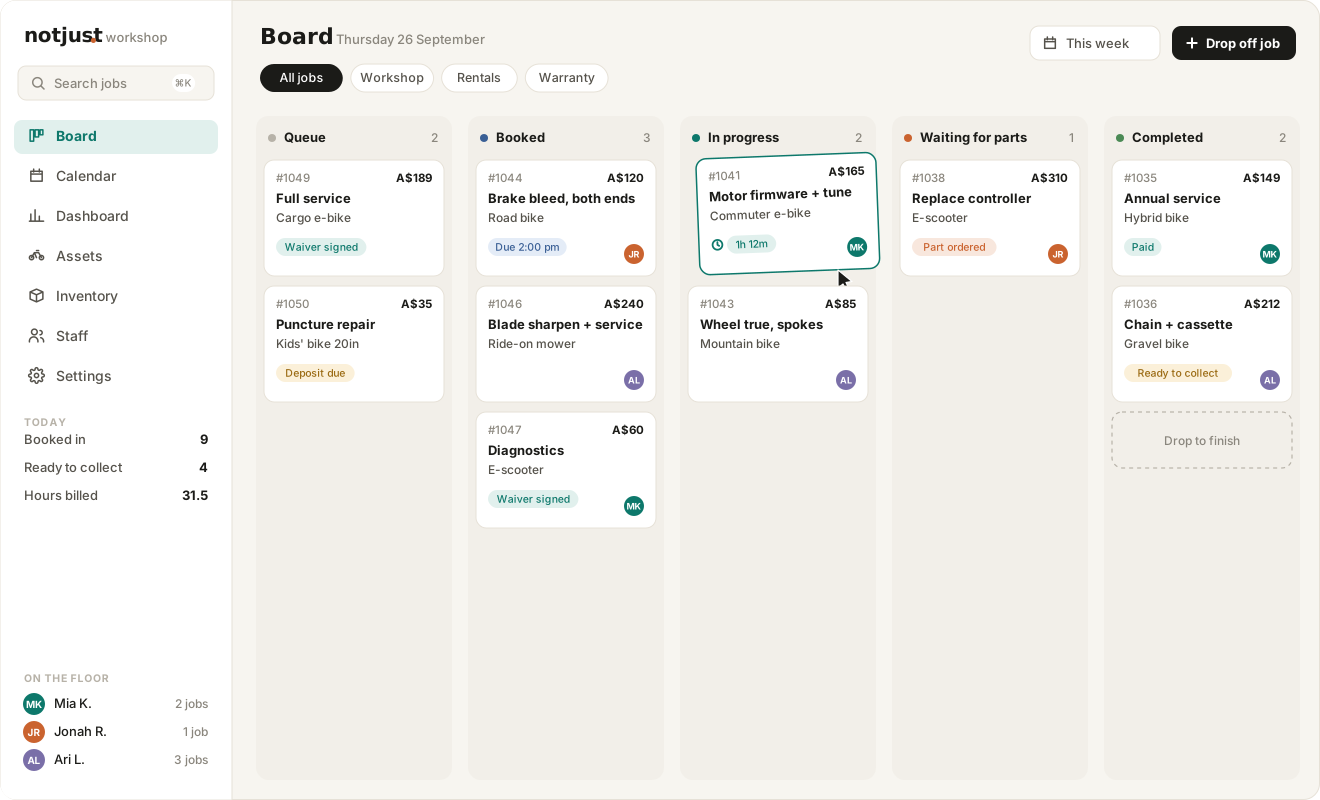
Most workshops start with a whiteboard, a spike of paper tickets or a spreadsheet. It works until the shop gets busy. Then a bike sits finished for three days because nobody told the customer, or a job waits for a part nobody ordered. A job board fixes this by making the state of every job visible to everyone, all the time.
Start with columns that match how work actually moves
Keep the built-in stages simple: booked, in progress, completed. Then add the in-between states your shop really has, like “Waiting for parts” or “Waiting for customer approval”. If a job can sit in a state for more than a day, it deserves its own column.
Booked: the job is in, nobody has started it
In progress: someone has taken it and the timer is running
Waiting for parts: blocked, with a note saying what’s on order
Completed: finished, waiting to be collected and paid
Keep a queue for jobs nobody has taken yet
A queue separates “booked in” from “assigned”. Staff take the next job from the queue instead of the owner handing out work. It also shows at a glance how much work is waiting, which is the number that decides whether you can accept another job today.
Tell the customer when the job moves
The most common complaint in any workshop is “I didn’t know it was ready”. Link the board to customer messages, so moving a job to Completed can send the ready-to-collect email, with the balance and your opening hours. The important part is control: you should see what would go out and choose whether to send it.
Clear the board every night
A board full of old jobs stops being useful. Paid, collected jobs should leave the board on their own at the end of the day, while unpaid ones stay until the customer picks them up. That way the board always shows today’s work, and nothing else.