← All guides
Timesheets
5 min read
Timesheets for cleaning crews: hours, output and approvals
How to get accurate hours from a team spread across sites, approve them in minutes, and pay by the hour or by the job.
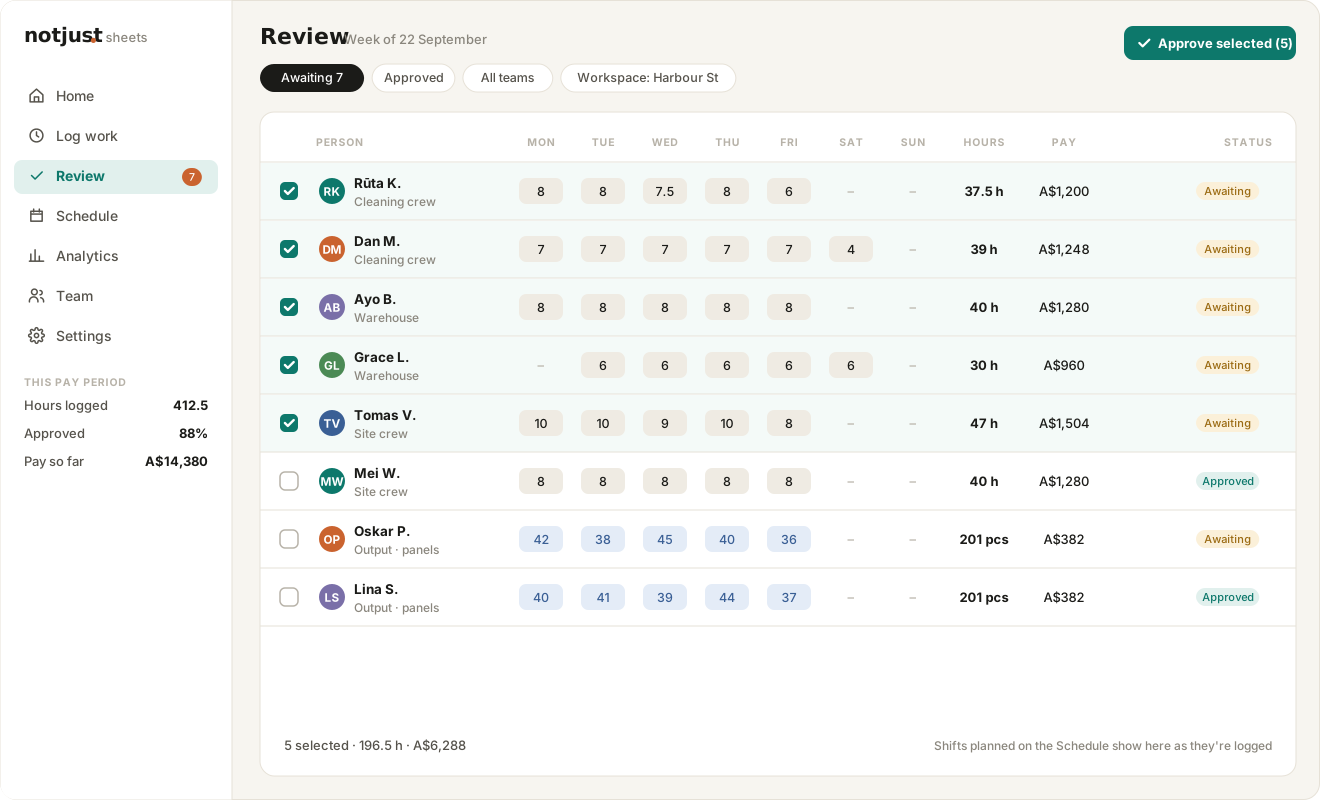
Cleaning, maintenance and site crews rarely sit at a desk. Paper timesheets come back late, smudged or not at all, and the manager spends Monday morning chasing hours instead of running the week. The fix is to make logging hours quicker than not logging them.
Let people log from their phone, at the end of the shift
A timesheet should take a minute: date, start and finish, and which site or job it was for. If the form is simple enough to fill in on the way to the car, you get hours on the day they were worked, not reconstructed on Friday.
Track output when that’s how you pay
Some crews are paid by the piece: rooms cleaned, panels installed, units packed. Tracking output alongside or instead of hours, with a rate per item, turns the timesheet into the pay calculation.
Approve in one pass
Review works best as a list of everything waiting, filtered by team or workspace. Check the unusual ones, tick the rest and approve them together. People should be told when their sheets are approved, so nobody wonders whether their hours were seen.
Filter to what’s awaiting approval
Open anything that looks odd
Approve the rest of the week in one go
Export for payroll as CSV or Excel